Updated November 2026.
Amazon catalog management is the ongoing work of keeping your product data (titles, images, attributes, identifiers, variations) correct, complete and compliant so your listings stay searchable and buyable. To fix suppressed listings, open the listing in Seller Central, read the exact issue Amazon names, correct it and save. To fix duplicates, merge them or file a case with proof. To fix wrong listings, correct the data, protect it with Brand Registry, and escalate to the Catalog Team with evidence.
| Quick answer: First identify which problem you have: suppressed (hidden from search), duplicate (two ASINs for one product) or wrong (incorrect data or wrong ASIN match). Each has a different fix. Pause ads on any ASIN that is suppressed so you do not pay for traffic that cannot convert. |
This guide uses public explanations from sellers, agencies and Amazon's own seller forum (October 2026). Seller Central menus change, so confirm each step in your account. Many guides are written by agencies that sell fixes, so we flag vendor claims and list what they miss.
What is Amazon catalog management?
| Catalog task | What it covers | If neglected |
|---|---|---|
| Data accuracy | Title, brand, images, bullets, attributes, GTIN | Wrong or conflicting product pages |
| Compliance | Image rules, prohibited terms, category requirements | Search suppression |
| Duplicates and variations | One ASIN per product; clean parent-child setup | Split reviews and sales |
| Brand control | Brand Registry, protection from outside edits | Third parties or glitches change your content |
| Monitoring | Regular checks of inventory and account health | Problems found after sales drop |
What is the difference between suppressed, inactive, duplicate and wrong listings?
| Problem | What you see | Typical cause | Fix path |
|---|---|---|---|
| Search suppressed | Listing exists but does not appear in search; may open by direct link | Missing attributes, bad main image, prohibited terms, pricing flag | Fix in Manage All Inventory, save, wait for re-index |
| Inactive | Offer exists but is not purchasable | Missing product ID or condition, unprocessed shipment, price alert | Complete data, check price and inbound shipment |
| Buy Box suppressed | Listing visible, no Add to Cart | Pricing or fulfillment issues | Review price and offer settings |
| Duplicate | Two ASINs for one product | Mismatched identifiers, third-party listings | Merge, or case with proof |
| Wrong listing | Wrong title, brand, image or ASIN match | Conflicting data, attribute overrides, bad GTIN | Correct data, Brand Registry, Catalog Team case |
Sources: SellerSprite, My Amazon Guy and Amazon Seller Central discussions. Sources use these terms loosely and sometimes disagree, so always follow the exact message Amazon shows for your listing.
3 catalog problems, 3 different fixes
How do you fix a suppressed listing on Amazon?
| Step | What to do |
|---|---|
| 1. Find it | Inventory > Manage All Inventory, then filter for Search Suppressed (or open Fix Your Products). You can also download the Suppressed Listings Report. |
| 2. Confirm | Search the exact product title on Amazon to see if it is missing. |
| 3. Read the cause | Open the listing and read the specific message Amazon gives. |
| 4. Quick test | Click Edit then Save. If the block stays, you need to fix data. |
| 5. Correct the cause | Fill missing attributes, fix the image, shorten the title, remove banned claims, or fix the price. |
| 6. Bulk fixes | Download the Category Listings Report, edit it, and re-upload as a file for many SKUs. |
| 7. Escalate | If still blocked after about 24 hours, open a Seller Support case and ask for the Catalog Team, with screenshots and batch ID. |
| 8. Pause ads | Pause ads on the ASIN until it is fixed, so you do not waste spend. |
Timelines in guides vary: some say minutes to 24 hours for simple fixes and days or weeks for policy or hazmat reviews (SellerSprite). A vendor claim of a roughly 50% chance of reinstatement within 48 hours has no source, so do not rely on it.
Suppressed listing fix path
- Find it: Manage All Inventory, Search Suppressed.
- Confirm: search the exact title on Amazon.
- Read the cause: use the exact message Amazon shows.
- Fix the data: image, attributes, title, claims or price.
- Save and wait: minutes to about 24 hours for simple fixes.
- Escalate: Catalog Team case with screenshots if still blocked.
- Pause ads: stop spend on the ASIN until it is live.
What causes Amazon listings to get suppressed?
| Cause | Examples | What to fix |
|---|---|---|
| Main image | Non-white background, text or logos, product under about 85% of the frame | Re-shoot or edit to Amazon image rules |
| Missing attributes | Department, size, color, material, unit count, price per unit | Complete required fields for your category |
| Title issues | Over the new length limit, promotional words, prohibited terms | Shorten and clean the title |
| Price | Price seen as an error or far from the Buy Box | Correct the price |
| Compliance | Prohibited claims, IP issues, hazmat flags, customer complaints | Remove claims, upload documents, appeal |
| Duplicate or conflicting data | Two ASINs or another seller changing content | Merge, protect with Brand Registry |
What changed with Amazon title length in 2026?
Amazon announced that from July 27, 2026 product titles must be 75 characters or less including spaces in all categories except media (Amazon Seller Central announcement). A new Item Highlights field adds up to 125 characters of searchable text. Amazon says listings stay active during the transition, and titles still over the limit are gradually replaced with AI recommendations. Brand owners get 14 days to review and approve those changes in Review Listings Changes.
| Item | Detail | Source |
|---|---|---|
| Title limit | 75 characters incl. spaces, all categories except media | Amazon Seller Central announcement |
| Item Highlights | Up to 125 extra searchable characters | Amazon Seller Central announcement |
| Effective date | July 27, 2026; rollout gradual through end of 2026 | Amazon; SalesDuo |
| Non-compliant titles | Amazon may apply AI-generated titles; not described as suppression | Amazon; SalesDuo |
| Review window | 14 days for brand owners | Amazon |
Older guides that say titles can run to 200 characters are out of date. Check your catalog for long titles and shorten them yourself so you control keywords and brand tone. See how this fits into listing optimization.
Amazon title rule from July 27, 2026
Titles must be 75 characters or less including spaces (all categories except media). Item Highlights add up to 125 searchable characters. Source: Amazon Seller Central announcement.
How do you fix duplicate Amazon listings?
| Step | What to do |
|---|---|
| 1. Detect | Search your UPC/EAN or product name in Seller Central and on Amazon to spot multiple ASINs for the same product. |
| 2. Check they match | Same brand, color, size, material, packaging. If they differ, they are not duplicates. |
| 3. Choose the main ASIN | Keep the one with the right data, reviews and history. |
| 4. Merge or request merge | Use Manage All Inventory merge option where offered, or open a Seller Support case under Products and Inventory for merge or split. |
| 5. Brand Registry | Only the rights owner can request a merge; non-owners are denied. |
| 6. Clean up | Remove redundant SKUs from your inventory after the merge, then recheck title, bullets, images, price and variations. |
Evidence that helps: manufacturer website, GS1 certificate or barcode lookup, packaging photos showing the barcode. Reviews from the source ASIN consolidate onto the target ASIN (My Amazon Guy). Guides do not clearly explain the effect on sales rank, so treat that as unknown. Never use another seller's ASIN or edit their listing: that violates Amazon policy.
How do you fix wrong listings: wrong data, attributes or ASIN?
| Situation | Fix |
|---|---|
| Amazon says your data conflicts with its catalog | Use Fix Your Products to accept Amazon's value if it is correct, or submit proof of ownership. |
| Someone changed your title, brand or images | Use Brand Registry to report and protect core attributes. |
| Product mapped to the wrong ASIN | Open a case with the Catalog Team with correct ASIN, SKU and GTIN, plus proof. |
| Invalid or reused UPC | Get a valid GS1 barcode; it may require a new ASIN and several cases. |
| Brand name change | Needs documents (trademark, UPC ownership, product images) and carries ranking and review risk; consult before starting. |
Proof to attach: manufacturer-hosted images, GS1 lookup screenshots, a photo of the physical product with barcode, and a plain statement of what is wrong and what it should be. Steps for wrong ASINs come from agency and AI-summary guides, so confirm them in Seller Central.
What do competitor guides leave out?
| Gap | Why it matters | How we cover it |
|---|---|---|
| Outdated title rules (up to 200 characters) | 75-character limit applies from July 27, 2026 | Official rule and what to do |
| Suppressed, inactive and Buy Box issues mixed up | Different problems need different fixes | Comparison table |
| Duplicates and wrong ASINs get one line | These need evidence and a clear path | Separate step tables |
| No mention of ad spend | You pay for clicks on suppressed ASINs | Pause-ads step and PPC link |
| Unsourced claims (reinstatement odds, “human error is the top cause”) | Sets false expectations | Marked as unsourced |
| No prevention routine | Problems return | Weekly and monthly checklist below |
| Hard to tell agency selling from helping | Most pages end in a sales pitch | We say plainly when to DIY |
How do you prevent catalog problems?
| How often | Check |
|---|---|
| Weekly | Search Suppressed and Inactive list; Account Health product policy notices; Review Listings Changes |
| Monthly | Titles over 75 characters; image compliance; variation structure; duplicate scan by UPC |
| Before launch | Valid GTIN, complete category attributes, compliant main image, no prohibited claims |
| After edits | Re-check Change History and live page |
Should you fix catalog problems yourself or hire help?
Fix it yourself when the issue is a missing attribute, an image or a title: these usually clear quickly. Get help when you have many ASINs, repeated suppression, merge or wrong-ASIN cases that need evidence, or you are losing sales and cannot find the cause. Pay for help only when an ASIN stays blocked after your own fix and a Catalog Team case.
How does Brandeonix help with catalog management?
Brandeonix starts with a diagnosis, so you know whether the problem is data, images or something else. Once the cause is clear, our Amazon Listing SEO service rebuilds titles, backend terms and A+ Content so your listings stay compliant and rank better. If images are the issue, we fix those too, and when listings are healthy we scale sales with PPC. For the wider picture, here is what Amazon marketing services usually include.
We cannot guarantee how fast Amazon reinstates a listing, and some fixes depend on Amazon's Catalog Team. See our case studies for results.
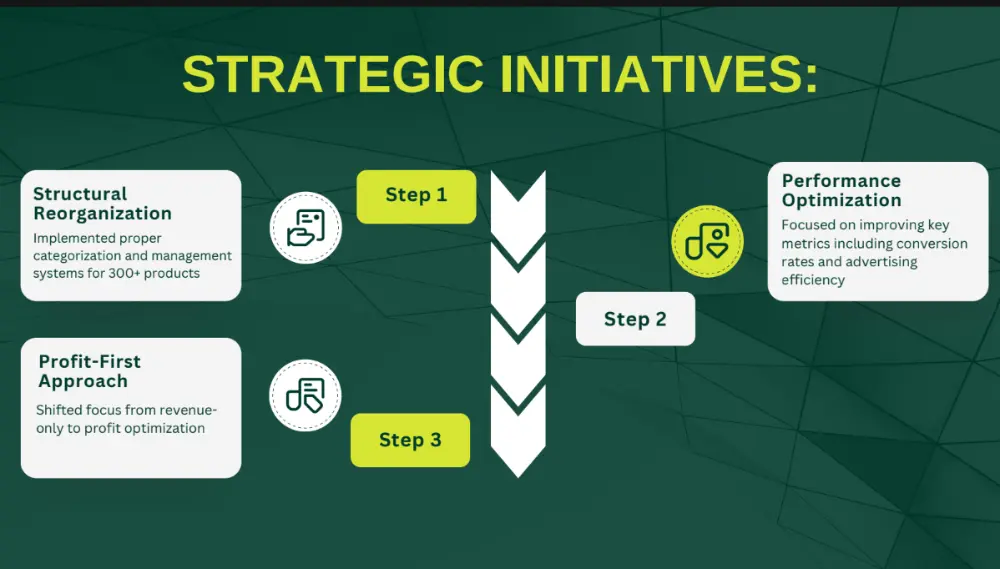
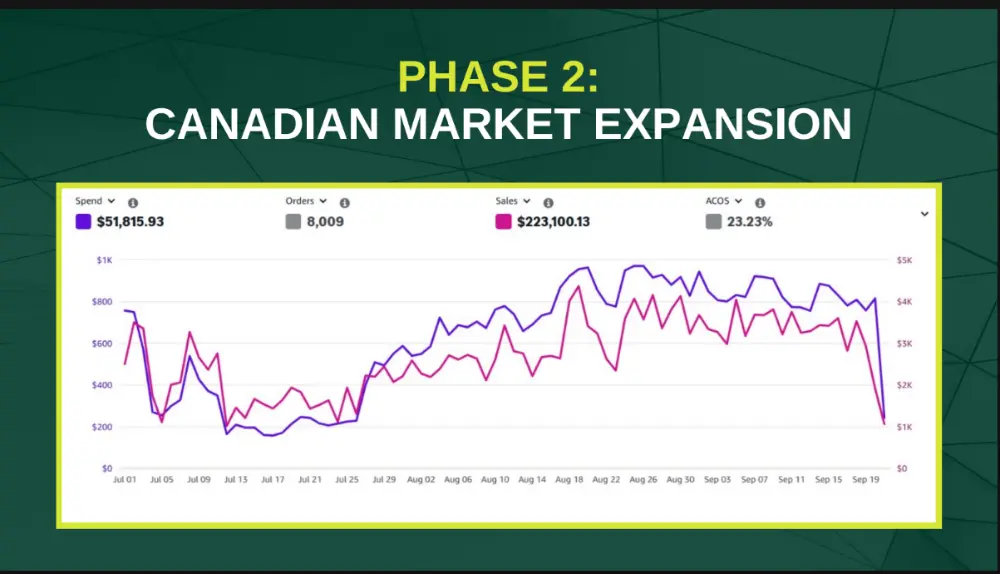
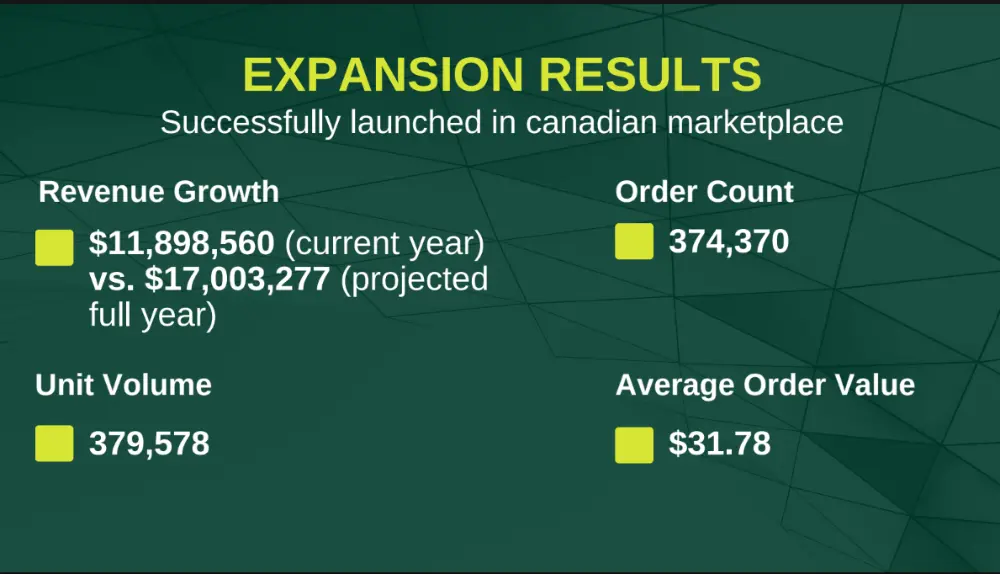
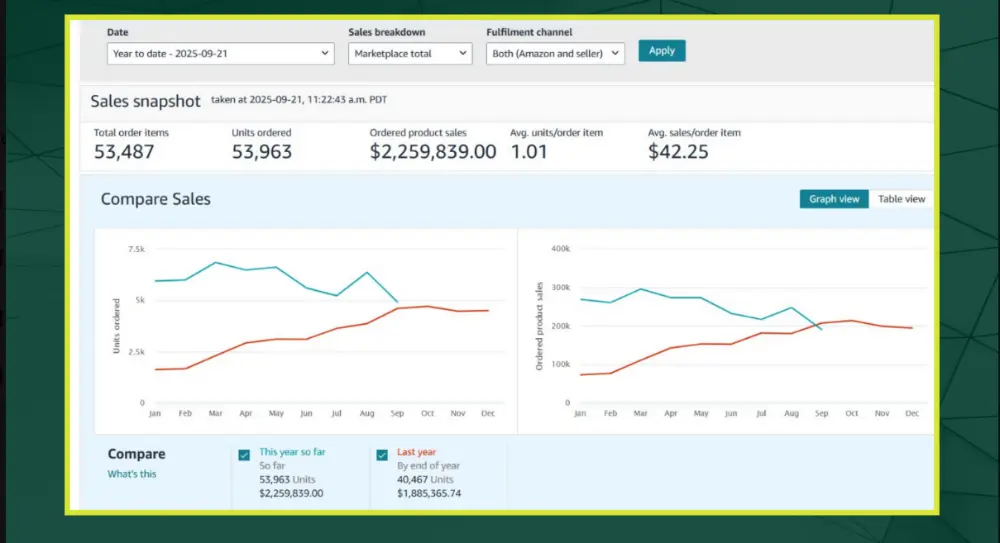
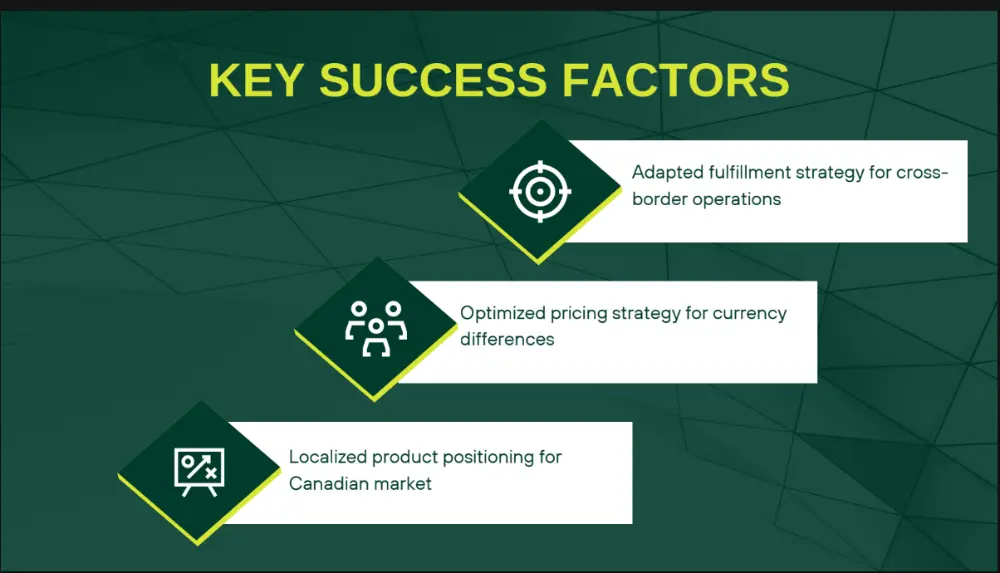
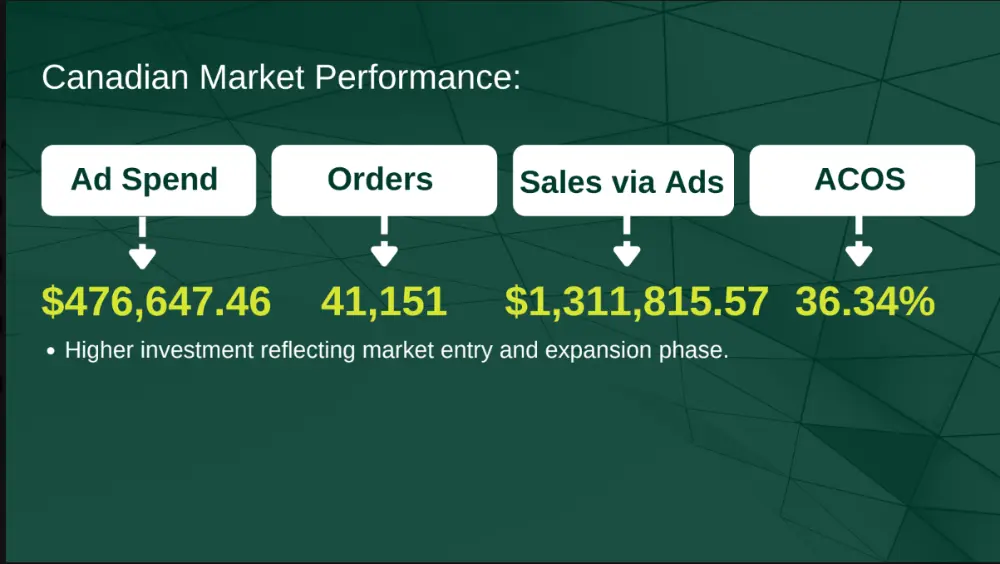
Real results from brands we work with
Screenshots from accounts we manage. Results vary by category, product and starting point.
Frequently asked questions
What is Amazon catalog management?
It is keeping your product data, images, attributes, identifiers and variations correct and compliant so listings stay visible and purchasable.
How do I fix a suppressed listing on Amazon?
Open Manage All Inventory, filter for Search Suppressed or use Fix Your Products, read the specific issue, correct it, and save. If it stays blocked, open a Seller Support case for the Catalog Team with screenshots.
Why is my Amazon listing suppressed?
Common causes are a non-compliant main image, missing required attributes, title or prohibited-term issues, pricing flags, or compliance problems.
How long does it take to fix a suppressed listing?
Simple fixes can clear in minutes to about 24 hours according to guides; policy or hazmat reviews can take days or weeks. These are vendor estimates.
How do I merge duplicate ASINs on Amazon?
Use the merge option in Manage All Inventory where available, or open a Seller Support case under merge or split listings, with proof the products are identical. Brand Registry owners can request merges as rights owners.
Do I lose reviews when merging listings?
Guides say reviews from the source ASIN consolidate onto the target ASIN. Effects on sales rank are not clearly documented.
How do I fix a wrong ASIN or wrong product data?
Correct the data in Seller Central, use Brand Registry to protect it, and if needed open a Catalog Team case with the correct ASIN, SKU, GTIN and proof such as barcode photos or GS1 lookup.
What is the new Amazon title limit?
From July 27, 2026, titles must be 75 characters or less including spaces in all categories except media, with an extra 125-character Item Highlights field.
Should I pause ads on a suppressed listing?
Yes. Pause ads on a suppressed or inactive ASIN until it is fixed, so you do not pay for clicks that cannot convert.
Can I fix catalog problems without an agency?
Yes for simple issues. Agencies help most with many ASINs, repeated suppression, and evidence-heavy cases like wrong ASINs and merges.
Not sure what is hurting your listings?
Book a call. We will check your catalog for suppression, duplicates and data problems and tell you what to fix first.
Ready to See What Your Ad Account Could Actually Do?
Get a free, no-obligation audit of your Amazon PPC account, we’ll show you exactly where you’re leaving money on the table and what a real strategy would look like.
- Takes less than a minute to submit
- No obligation, no pressure, just a real look at your account
- We’ll tell you honestly if we’re a good fit

The Smart Sellers Edge
AI breakthroughs that help smart Amazon sellers outsell the competition.