Updated November 2026.
Amazon A+ Content converts when each module answers one buyer worry, the layout reads on a phone, and nothing breaks Amazon’s content rules. A proven order is: hero banner, benefit blocks, lifestyle or how-to use, proof, and a comparison chart. Amazon reports lifts of up to 8% for Basic A+ and up to 20% for Premium A+, but those are upper bounds, not promises.
| Quick answer: Design A+ Content around what shoppers doubt, not around what looks nice. Use short text, one idea per module, a comparison chart of your own products, and check the mobile preview before you submit. Never name competitors, add prices or use unproven claims like “best-selling”. |
This guide compares what the top pages say (Riverbend Consulting, Cueball Creatives, Amazon’s own seller blog, SalesDuo, Kapa99, Elite Mindz and others), then adds the parts they leave out. We checked specs and rules against several current sources; Amazon can change limits, so confirm the final numbers inside A+ Content Manager.
What is Amazon A+ Content and does it really increase sales?
A+ Content (also called Enhanced Brand Content) replaces the plain product description with images, text, comparison charts and, for eligible brands, video. It sits below the bullet points on the detail page, so it works on shoppers who are already interested but not yet sure.
Reported lifts vary by source. Amazon’s figures, as repeated by seller guides, are up to 8% more sales for Basic A+ and up to 20% for well-built Premium A+. Jungle Scout cites an Amazon study with an average conversion lift of 5.6%. Treat all of these as upper or average figures, since the result depends on traffic, price, reviews and how weak the old page was.
Reported sales lift from A+ Content (as cited by seller guides)
Average conversion lift (Amazon study via Jungle Scout)
Basic A+ upper bound
Premium A+ upper bound
Bar length is relative to 20%. These are reported figures, not guarantees for your listing.
Basic A+ vs Premium A+: what is the difference?
| Item | Basic A+ | Premium A+ |
|---|---|---|
| Main banner image size | 970 x 300 px | 1464 x 600 px |
| Modules on a detail page | Reported as 5 (the tool may allow more) | Reported as 7 |
| Module types | About 14 as reported | About 19 as reported |
| Extras | Text, image, comparison and basic video/hotspot layouts | Larger images, interactive hotspots, video and image carousels, enhanced comparison chart, Q&A |
| Reported upper-bound lift | Up to 8% | Up to 20% |
| Access | Brand Registry brand owners (Professional seller accounts) | Extra criteria shown in A+ Content Manager |
Premium eligibility is the part guides disagree on. Jungle Scout reports that all brand-owned ASINs need a published Brand Story and you need at least five approved A+ submissions in the past 12 months, and notes Premium has been free during a promotion. Amazon can change this, so check whether Premium appears in your A+ Content Manager before planning around it.
What layout converts best on an Amazon product page?
The strongest pages follow the shopper’s questions from top to bottom. Here is a sequence you can adapt to Basic or Premium:
| Order | Module | Job it does | Keep it simple |
|---|---|---|---|
| 1 | Hero or brand banner | Show the product and the main promise at once | One headline, one product shot |
| 2 | Feature-to-benefit blocks (3 or 4) | Explain what each feature lets the buyer do | One short benefit line per image |
| 3 | Lifestyle or “how to use” image | Show size, scale and real use | Add dimensions if size is a common doubt |
| 4 | Proof module | Materials, certifications, warranty, close-ups | Name the certifying body and year for any award or certification |
| 5 | Comparison chart | Answer “which one should I buy?” within your own line | Your products only, no competitor names |
| 6 | Brand Story (separate section) | Build trust across all your ASINs | Not a substitute for product proof |
The simple A+ flow
What are the A+ Content image sizes and file rules?
| Spec | Reported value |
|---|---|
| Basic A+ banner | 970 x 300 px (maximum) |
| Premium A+ banner | 1464 x 600 px (maximum) |
| File types | JPG, PNG or BMP |
| File size | Under 2 MB per file |
| Colour mode | RGB (CMYK is not supported) |
| Other module sizes | Vary by module; the size next to each template in A+ Content Manager is the one to follow |
Amazon scales oversized images down but does not scale small ones up, so export at the largest size the module asks for. If you want the full list for the module you are using, the box inside A+ Content Manager is the reliable source.
What does a good A+ module look like? (examples)
These are illustrative rewrites, not client results. The pattern is the same in any category: replace a spec with the outcome it gives the buyer.
| Weak module | Stronger module | Why it works |
|---|---|---|
| “Premium 304 stainless steel” | “Keeps drinks cold 24 hours, no metal taste” (only if tested and true) | States the outcome, and it is a claim you can back up |
| A paragraph about the company | Three icons: material, warranty, certification | Scannable on a phone |
| The main listing photo reused | Product in use with a size reference | Adds new information instead of repeating |
| A chart listing competitor brands | A chart comparing your 3 sizes or bundles | Allowed, and it helps cross-sell |
What mistakes should you avoid with A+ Content?
| Mistake | Why it hurts | Fix |
|---|---|---|
| Walls of text | Shoppers skim; long copy inside images is unreadable on mobile | One idea per module and short overlays |
| Ignoring the mobile preview | Wide side-by-side layouts stack on phones and small text becomes illegible | Check the mobile preview and increase text size until it reads without zooming |
| Repeating the listing images | Adds no new information | Use A+ for new angles, scale, comparisons and proof |
| Designing before checking module specs | Wrong sizes lead to blurry or rejected images | Check each module’s size first |
| Naming competitors, prices or promotions | Breaks Amazon rules and can cause rejection | Compare only your own products |
| Unproven claims such as “best-selling” | Rejected unless Amazon allows it with proof | Remove, or state a specific verifiable fact |
| Treating every module as equally important | Dilutes the main message | Put the biggest buyer worry in the first module |
| Brand name that does not match Brand Registry | Can delay or block submission | Use the exact registered name |
What does Amazon not allow in A+ Content?
Guides summarising Amazon’s rules agree on these points; read the current guidelines in Seller Central before you submit:
| Not allowed | Example |
|---|---|
| Prices, sale or discount language, “buy now” | “50% off”, “limited-time deal” |
| Unsupported superlatives | “Best-selling”, “top-rated” |
| Customer reviews or star ratings | Review quotes and star graphics |
| Competitor brands or products | “Better than Brand X” |
| Links, URLs, QR codes or contact details | “Visit our website” |
| Awards or endorsements without source | Badges without the certifying body and year |
| Images that do not show the product sold | Generic stock photos only |
Review time is not fixed. Jungle Scout says approval can take up to seven days, and rejection reasons show in the project status in A+ Content Manager. Fix the item and resubmit, which restarts the review.
How do you test whether new A+ Content works?
Many competitor posts say “A+ boosts conversion” but do not explain how to check. A simple method:
3-step A+ test
Jungle Scout suggests tracking Unit Session Percentage for two to four weeks before judging results. A+ Content tends to pay off most on high-traffic products, so start with your best-selling ASINs.
What do competitor guides leave out?
| Gap in top-ranking pages | What this guide adds |
|---|---|
| Quote lift numbers without saying they are upper bounds | Separates Amazon’s upper bounds from the 5.6% average |
| Give a font size (such as 20pt) with no Amazon source | Says Amazon gives no fixed font rule; test legibility on the mobile preview |
| List modules but not the order of the buyer’s doubts | Gives a module sequence tied to shopper questions |
| Show examples without saying what is illustrative | Labels examples as illustrative, not results |
| Rarely explain how to measure the result | Gives a baseline, one change, compare method |
| Skip Premium eligibility or imply everyone qualifies | Flags that criteria vary and must be checked in your account |
How does Brandeonix help?
Brandeonix is an Amazon agency. We review whether your A+ Content answers what shoppers doubt, then connect it with Amazon Listing SEO so titles, bullets and images work together. We do not promise a fixed lift, since results depend on traffic, price and reviews.
If you also fix suppressed or wrong listings first, see our guide to Amazon catalog management. See our case studies for Amazon results.
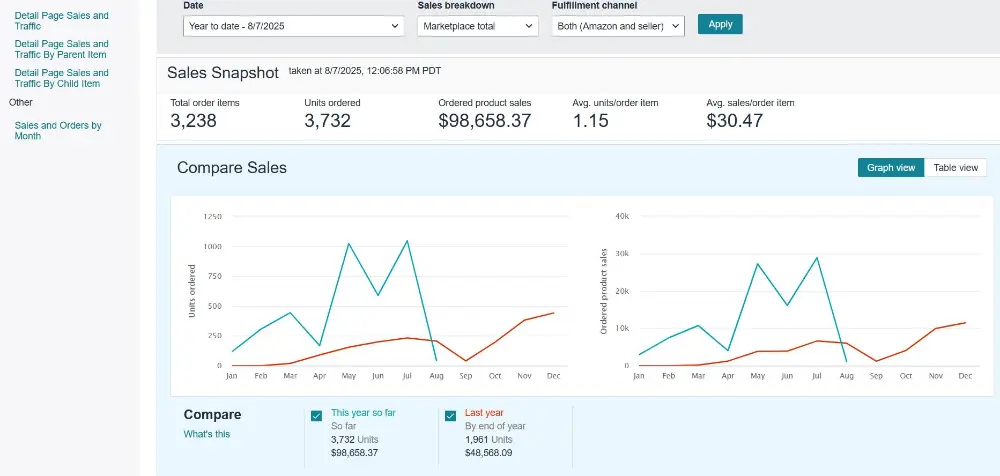
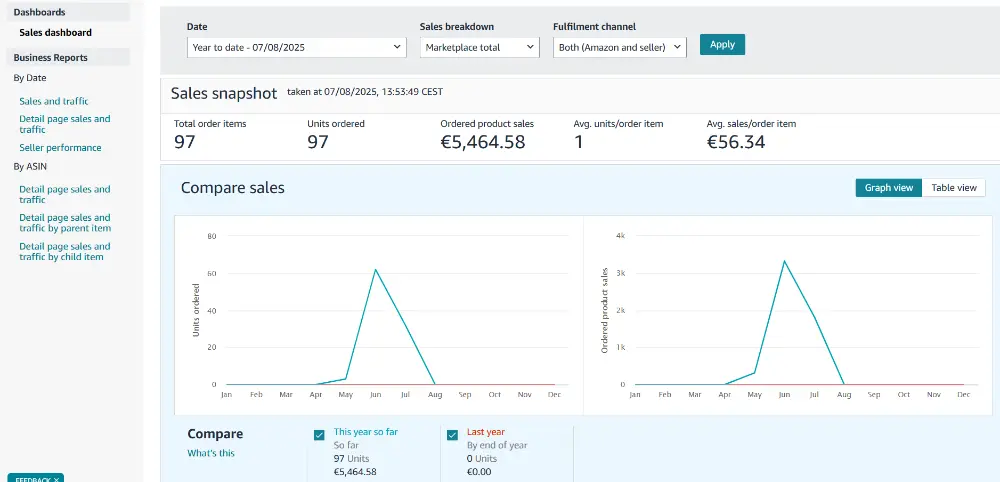
Real results from brands we work with
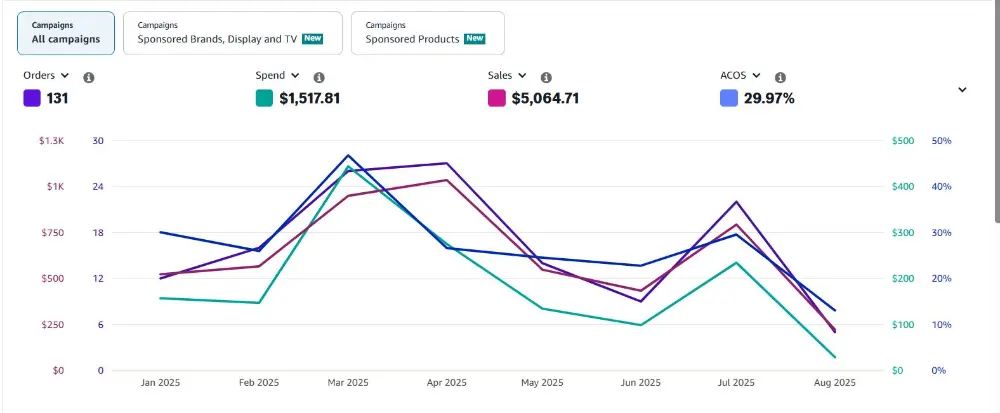
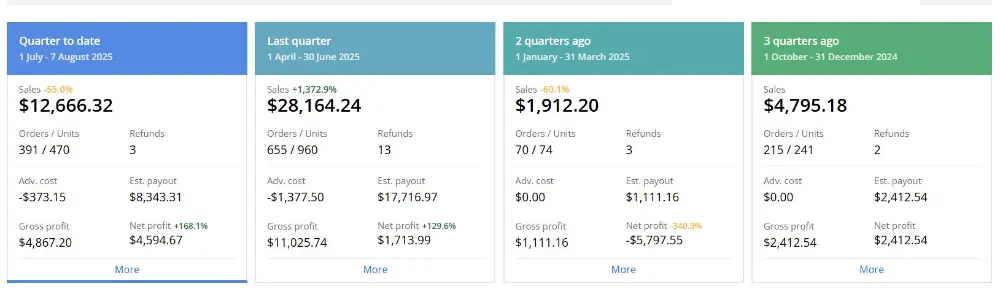
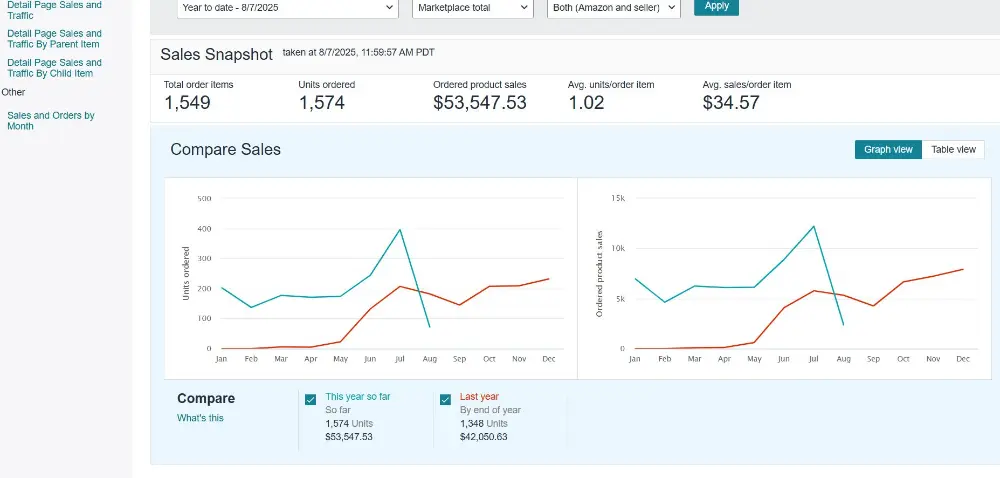
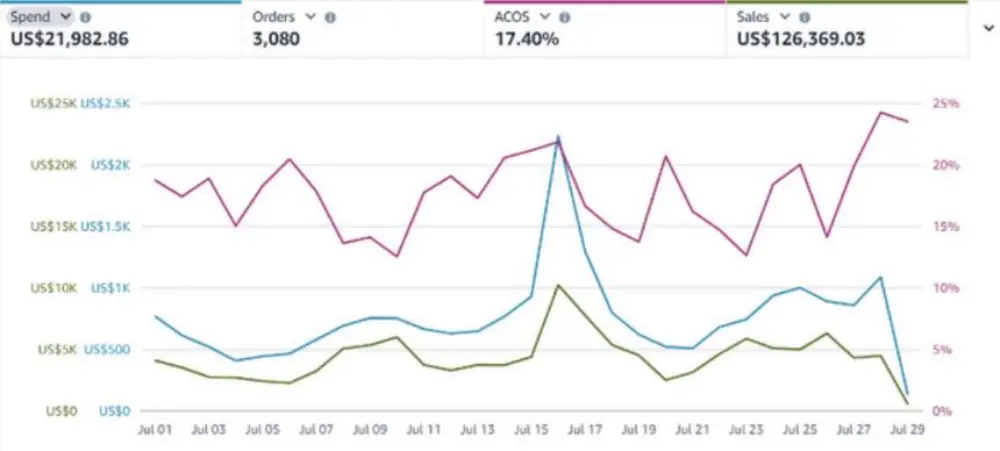
Screenshots from accounts we manage. Results vary by category, price and starting point.
Frequently asked questions
What is Amazon A+ Content?
Enhanced product description made of image and text modules shown below the bullets on an Amazon listing. Brand-registered sellers can add it for free.
Does A+ Content increase sales?
It can. Amazon’s reported upper bounds are up to 8% for Basic and up to 20% for Premium, and Jungle Scout cites an average 5.6% conversion lift. Your result depends on traffic, price and reviews.
What is the Amazon A+ Content banner size?
Reported as 970 x 300 px for Basic and 1464 x 600 px for Premium. Each module shows its own size in A+ Content Manager.
What is the difference between Basic and Premium A+ Content?
Premium adds larger images, interactive hotspots, carousels, an enhanced comparison chart and Q&A. Eligibility criteria are shown in A+ Content Manager.
How many modules can I use?
Guides report 5 for Basic and 7 for Premium, though the tool may allow more. Follow what A+ Content Manager shows.
How long does A+ Content approval take?
Jungle Scout reports up to seven days. Rejections show the reason in the project status.
Can I mention competitors or prices?
No. Competitor names, prices, promotions, reviews and links are not allowed.
Can I use a comparison chart?
Yes, to compare your own products. Do not include competitor brands.
What font size should I use?
Amazon gives no fixed size. Use the mobile preview and make sure text is readable without zooming.
How do I know if A+ Content works?
Record Unit Session Percentage before, change one thing, and compare after 2 to 4 weeks, or use Manage Your Experiments if eligible.
Sources checked: SERP pages from Riverbend Consulting, Cueball Creatives, Amazon Sell, SalesDuo, Kapa99, Elite Mindz and Xneeti, plus specs summarised by Jungle Scout, GreenOnion and Pikes. Figures are as reported by those sources; verify limits in A+ Content Manager.
Want help making your Amazon listing convert?
Book a call. We will review your listing and A+ Content and tell you what to fix first.
Ready to See What Your Ad Account Could Actually Do?
Get a free, no-obligation audit of your Amazon PPC account, we’ll show you exactly where you’re leaving money on the table and what a real strategy would look like.
- Takes less than a minute to submit
- No obligation, no pressure, just a real look at your account
- We’ll tell you honestly if we’re a good fit

The Smart Sellers Edge
AI breakthroughs that help smart Amazon sellers outsell the competition.